Showing posts with label Adobe Flash Player. Show all posts

Thursday, December 29, 2011

HTML 5 vs Flash

English: Adobe flash cs3 logo self made
Logotipo oficial: HTML 5  VS

(Photo credit: Wikipedia)


Note: HTML5, JavaScript, CSS and Flex are complementary technologies that can work seamlessly together.

HTML 5:
How does an HTML based data driven application works
1. User request the server page
2. Web server locates the file and passes it to the application server for processing.
3. Business logic of the code accesses the system resources like database, mail server and file system.
4. Server generates a dynamic HTML page from the requested data and service.
5. This dynamically generated HTML page is returned to the browser for rendering.

Apache Flex
How adding an compiled SWF file in the server works
1. User request the server page
2. Web server locates the file and passes it to the application server for processing.
3. Business logic of the code accesses the system resources like database, mail server and file system.
4. Server generates a dynamic HTML page from the requested data and service.
5. the generated HTML code with and embedded SWF file reference. (JavaScript code auto-generated by the Flash Builder is used for embedding SWF file into the HTML file).
6. the HTML code reaches browser for rendering
7. Browser requests that the SWF file be downloaded and rendered in Flash Player (as a small widget or an entire application view in the HTML page).
8. the SWF file in the browser can directly communicate with the server code. This allows for dynamic content to update the Flex application UI without refreshing the HTML page and decreases the number of requests to the server and the amount of content that is transferred over the network.

Another good comparision of Flash vs HTML 5 is available at the website.
http://flashvhtml.com/

Flex framework automatically takes care of adjusting the application layout as per the form factor of the device running the application while in HTML 5 the developer needs to take of detecting the platform and device and laying out the components as per the target form factor. But this gap is getting closed widget frameworks like JQuery which are also supporting eventing and data binding and the  forward momentum is with Html and JS.

Read this Interesting Blog published by Gartner about "HTML 5 vs Flash".

Features not possible to implement without Flash.

1. Copy to Clipboard

As of Today (September2014) its not possible to implement Copy to Clipboard functionality in a web page that works consistently and flawlessly across all major browsers (Mozilla Firefox, Chrome, Safari, and Internet Explorer). Suppose you want to develop a button on click of which you want to copy to your Windows or Mac Clipboard some text content say value of any text area within a form. This can only be achieved by using Flash. With JavaScript only approach you would only be able to do this for Internet Explorer (IE). Presently the most reliable solution is to use ZeroClipboard (http://zeroclipboard.org/) which internally make use of a hidden Flash movie and JavaScript interface to achieve this functionality in a secure way. 

Related Articles

Friday, August 28, 2009

Flash Player Security Model

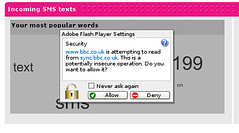
Flash cross domain request security prompt
    You make asynchronous HTTP Service Requests in Adobe Flex.

    Synchronous HTTP Service Requests could be made using JavaScript XMLHTTPRequest with the following parameters:

    xmlHTTPRequest.open("GET", "http://anyurl.com/", false)
    • RequestType: GET or POST
    • URL of the service
    • Comunication Type: true - asynchronous, false for synchronous
    important configuration files used in Adobe Flex
    1. crossdomain.xml
    2. services-config.xml - used for Flex Data SErices

    Data Push can be implemented in Adobe Flex using BlazeDS Server or LiveCycleDataServices


    How to Make HTTP Request to a Different Domains

    More DIY videos at 5min.com

    How to connect to HTTP Service using Adobe Flex 3

    Part 1: Introduction

    More DIY videos at 5min.com

    Part 2: Getting the code work

    More DIY videos at 5min.com

    Handling Result Event

    More DIY videos at 5min.com

    Handling Fault Event

    More DIY videos at 5min.com


    Reblog this post [with Zemanta]

    Tuesday, July 28, 2009

    Getting Inspired & Exploring the possibilities of Adobe Flex, updated

    English: Differentiation of Java technologies ...
    Image via Wikipedia
    Now its time to browse some Rich Internet Applications (RIA) built in Adobe Flex.

    Rich Internet Applications are web applications that works like full fledged desktop applications.

    They can be delivered to the user through a site specific browser either through a plug in or virtual machines.
    site-specific browser (SSB) is a software application that is dedicated to accessing pages from a single source (site) on a computer network such as the Internet or a private intranet. SSBs typically simplify the more complex functions of a web browser by excluding the menus, toolbars and browser chrome associated with functions that are external to the workings of a single site. These applications can be started by using mostly a desktop icon using the favicon.[1]
    Examples of site-specific browser
    RIAs let you perform in-line editing, drag and drop items or otherwise interact directly with elements.
    Popular browser based RIAs include Flickr, Google Maps, and eBay.

    Why Adobe Flex ?

    Flex is a highly productive, free open source framework for building and maintaining expressive web applications that deploy consistently on all major browsers, desktops, and operating systems.
    Flex applications can be built using Flex SDK or Adobe Flex Builder 3. It is basically a collection of technologies developed by Adobe which can be used for the development of cross platform Rich Internet Applications (RIA).
    Flex applications can be delivered on the web via the Flash Player or to the desktop via Adobe AIR
    Flex requires server-side technologies like Java, SAP NetWeaver, ASP.NET or PHP to provide it with real-time data.

    Adobe Flex is used across broad variety of industries and use cases.

    Flex showcase which is a Flex application letting you browse and search for publicly available Flex applications. Many companies are developing Flex RIAs for internal applications.

    Feel free to explore different the Flex showcase on your own, this will provides you with good inspiration and great ideas, and will lets you see what Adobe Flex is capable of.

    1. Adobe Flex Showcase
    2. Adobe AIR Application Showcase

    Flex development can be beneficial not only to developers but also to end-users. Due to Flex programming model you can get scalable and reliable solutions. Even these solutions can be re-designed whenever needed. 

    Please click the link below to get Tour de Flex application which provides over 600 running samples with source code!

     "Tour de Flex" and "Tour de Flex Mobile" - provides collection of Flex applications showcasing the capabilities of the technology for web/desktop and mobile application development respectively.

    Related articles

    Which is better React Native or Native iOS and Android Development for building Mobile applications ?

      React Native vs Native (iOS, Android)   Properties/Feature React Native   Native (iOS) – Swift / Object...

    Labels