Showing posts with label Adobe Flex. Show all posts

Friday, October 19, 2012

ASC 2.0 vs Falcon

ActionScriptActionScript (Photo credit: Wikipedia)
Falcon, the next-generation MXML and ActionScript compiler that is currently under development 

Following are the key differences between Falcon and ASC 2.0

- ASC 2.0 is essentially a fork of Falcon. 
- Falcon was branched off from ASC 2.0 in summer 2012 and the packages were renamed from com.adobe.flash to org.apache.flex.
-  Falcon supports Flex (MXML)
ASC 2.0 is mainly focused on gaming.


the new ActionScript Compiler (ASC 2.0) is part of the AIR 3.4/FP 11.4 SDK. The complete release notes are available here. It things like Concurrency (ActionScript Workers) support for debugging and more.

Wednesday, July 4, 2012

Build an SAP backend Flex Application using LCD Services

SAP Headquarters, Building 1SAP Headquarters, Building 1 (Photo credit: Wikipedia)

This video demonstrates how to build Adobe Flex applications that fetches information from SAP R/3 backend system using the new feature of Flash Builder and a new SAP Connector component in Adobe LifeCycle Data Services.

 
try this feature and share your feedback if you find this information useful.

Tuesday, May 22, 2012

Pros & Cons of use of Adobe Flex for iPhone/iPad Developers

Below are the pros and cons of Adobe Flex (http://www.adobe.com/products/flex.html) environment for iOS development.

Pros:
1. No specific Hardware need: No need for Mac OS X system for development ( works on both platforms Mac & Windows).
2. Code sharing across multiple platforms: Run the same code on other mobile platforms (BlackBerry Playbook and Android), desktops & web applications (browsers)
3. SAP Data Integration: Ease of integration with SAP backend & Web Services (or to other standard data sources)
4. Improvement Developer Productivity (Adobe Flex / ActionScript would be easier to learn for a Java developer than Objective C).
5. Design Time Integration: Eclipse based developer (Flash Builder) environment or developer tools can be integrated with SAP NetWeaver Developer Studio.
6. Low Training Cost, there are plenty of examples and development tutorials available for free to get started with Adobe Flex. 
7. SAP NetWeaver GateWay Integration: https://community.wdf.sap.corp/sbs/groups/adobe-flex/blog/2011/09/02/flash-builder-and-sap-netweaver-gateway-integration
Cons:
1. Dependency on Flash Platform.
2. Licensing Cost of Software:  Cost of Development tool, Adobe Flash Builder Premium license costs $699. (on single license purchase, there may be discounted price for bulk purchase)

Sunday, December 18, 2011

Adobe Flex is now Apache Flex


Adobe has submitted the code for Flex framework along with number of other related components (including Testing Framework, BlazeDS, Falcon compiler) to the Apache Software Foundation (ASF) so that it could be managed as an independent project.

The Flex project proposal has been accepted by Apache Software Foundation.

For further details please refer Adobe's official blog: http://blog.everythingflex.com/2011/11/16/apache-flex-update-from-adobe/. However,  Adobe might continue to dedicate its employees full time for further development of the Flex.

Discussions related to this recent announcements regarding Flex and the Flash Platform.


Incubator proposal of Flex could be found at the link below:
http://wiki.apache.org/incubator/FlexProposal

Earlier Adobe also announced that it would not develop Flash Player for new mobile devices following the Flash Player 11.1 release for Android and BlackBerry Playbook, and would instead focus on tooling for HTML5, which will eventually provide similar functionality as that of Flash without requiring a separate plug-in.

Adobe will however continue to provide critical bug fixes and security updates for existing device configurations. More details about this could be found at this blog http://blogs.adobe.com/flashplatform/2011/11/flash-to-focus-on-pc-browsing-and-mobile-apps-adobe-to-more-aggressively-contribute-to-html5.html

Wednesday, November 16, 2011

What's New in Flex 4.6 SDK and Flash Builder 4.6

Below is the Blog link from Adobe Developer Connection about  - What's new in Flex 4.6 SDK & Flash Builder 4.6:
http://www.adobe.com/devnet/flex/articles/whats-new-flex-flash-builder-46.html

Key Improvements include:
  • New UI Components
  • Support for latest Google tablet platform and iOS 5
  • Enhanced Tooling (including monitoring and unit testing of mobile applicaitons)
  • Performance Improvement
This is the final official Adobe release of Flex. Future versions of Flex SDK will be managed as an independent project by Apache Software Foundation (ASF).


Thursday, August 4, 2011

17 Awesome Frameworks for Adobe Flex


The model, view, and controller (MVC) pattern ...
Image via Wikipedia

How to architect a Flex application ?

Key Feature of a good Flex application are:
  1. easy maintainability, 
  2. extensible and
  3. re usability
Architectural Best Practices
  1. Instead of a single monolithic interface, break up the interface into separate views (that are typically separate MXML components); 
  2. build collections of independent, loosely coupled components that define and broadcast custom events that the rest of the application can then listen for and respond to. 
  3. organize your data, logic, views and notifications, or by using one of the many microarchitectures, including Cairngorm, PureMVC, Parsley, Mate or Swiz.

Frameworks:

1.Caringorm - An open-source micro-architecture (collection of design patterns) for Flex developers.

2.PureMVC - PureMVC is a framework for creating applications based upon the well-established Model, View and Controller design pattern.

3.Model-Glue : Flex -
Model-Glue: Flex brings implicit invocation, Model-View-Controller design, and cleaner, less repetitive integration with backend services to Flex 2.0 and AIR applications.

4.Foundry - quick an easy framework for Flex 3 development

5.Guasax Flex Framework - Guasax is an ease of use programming framework which provides the creation of an ordered and scalable application with Adobe Flex. Lifecycle of guasax framework is based in the MVC pattern to take on our program actions. Guasax framework helps you to maintain your business logic tier highly decopled from your presentation logic tier. Guasax takes reflection and introspection techniques as well as IoC pattern to execute the operations which we have pointed at and to make a decision about itselves. 

6. ARP - ARP currently supports Macromedia® Flash® and Flex™-based RIA Development in ActionScript 2 and ActionScript 3. ARP is designed to be simple to use and lightweight.

7. Flest Framework - Flest is an ActionScript3 / Flex application framework for building enterprise level RIAs. It uses such design pattern as Controller, Factory, Command, etc. High efficiency, simplicity and practicality were set as its mandatory design features.

8.Mate - Mate is a tag-based, event-driven Flex framework. Flex applications are event-driven. Mate framework has been created to make it easy to handle the events your Flex application creates. Mate allows you to define who is handling those events, whether data needs to be retrieved from the server, or other events need to be triggered. In addition, Mate provides a mechanism for dependency injection to make it easy for the different parts of your application to get the data and objects they need.

9.Swiz - Swiz is a framework for Adobe Flex that aims to bring complete simplicity to RIA development. Swiz provides Inversion of Control, event handing, and simple life cycle for asynchronous remote methods. In contrast to other major frameworks for Flex, Swiz imposes no JEE patterns on your code, no repetitive folder layouts, and no boilerplate code on your development. Swiz represents best practices learned from the top RIA developers at some of the best consulting firms in the industry, enabling Swiz to be simple, lightweight, and extremely productive.

10.Penne Framework - The Penne Framework is a light weight framework used for enterprise Adobe Flex 3 Applications.

11.Gaia is an open-source front-end Flash Framework for AS2/3 designed to reduce development time.

12.robotlegsRobotlegs is a pure AS3 micro-architecture (framework) with a light footprint and limited scope. Simply put, Robotlegs is there to help you wire your objects together. It provides the glue that your application needs to easily function in a decoupled way. Through the use of automated metadata based dependency injection Robotlegs removes boilerplate code in an application. By promoting loose coupling and avoiding the use of Singletons and statics in the framework Robotlegs can help you write code that is highlytestable.

13.thin-red-line - This is an extension of the Cairngorm Flex framework created to address all the issues not covered by Adobe. The source code contains both the actual framework and a very simple Flex app demonstrating how the whole thing works.

14. flex-slide - Slide is an application framework for projects built in Flex 2 or 3.
Key features:
  • Uses familiar design patterns
  • Robust MVC structure
  • View state management decoupled from view implementation
  • Flexible approach to model and controller access, eliminating need for singleton classes.
  • Separate view presentation from view functionality
  • Incorporated debugging and development tools
Benefits:
  • Helps with project planning through visual design to production
  • Increases the proportion of your codebase that is easily testable
  • Makes dependencies transparent (appropriate abstraction and decoupling, not unhelpful indirection)
  • Plays to Flex's strengths, reducing the quantity of code
  • Encourages convention, but does not depend on it
  • Simplifies view management

15. dunelox - Dunelox is a library of components and utilities to implement Flex applications designed around Conversations.

16. mainline-flex - Mainline is a simple Dependency Injection / IoC framework for Adobe Flex, Air, and ActionScript. It does what it needs to, but otherwise stays out of your way.


17. Parsley is an application framework for Flex/Flash/AIR applications written in AS3.

Spicelib is a suite of independent AS3 libraries that Parsley builds upon, but that can also be used separately.

Parsley features:
  • Flexible IOC Container: Supports configuration with AS3 Metadata, MXML, XML files, ActionScript
  • Dependency Injection: Injection by type or id - for constructors, methods or properties
  • Decoupled Bindings: Bindings where source and target are fully decoupled, based on a publish/subscribe mechanism
  • Messaging Framework: Fully decoupled senders and receivers, can serve as a basis for MVC architectures
  • Dynamic View Wiring: Easily wire Flex components to objects declared in the container
  • Advanced container features: Asynchronously initializing objects, object lifecycle, modular configuration contexts
  • Integration with Flex Modules: Allows configuration to be loaded and unloaded alongside Flex Modules
  • Localization: Integrates with Flex ResourceManager for Flex Applications, contains its own Localization Framework for Flash Applications
  • Extensibility: Easily create your own configuration tags, a single implementation can be used as AS3 Metadata, MXML or XML tag
  • And much more...


Saturday, May 21, 2011

Adobe Flex Builder 4.5 - A game changer release


Today a developer faces a challenge of making their applications run on multiple platforms. With Adobe Flash Builder 4.5 the same code works smoothly and uniformly in every device. Adobe Flex is the single framework to build applications compatible across almost all major browsers, devices and operating systems.

It supports the following platforms:
  • For Desktop Applications multiple Operation Systems
    • Windows,
    • Mac
    • Linux
  • For Rich Internet Applications (RIAs) multiple Browsers
    • Chrome
    • Internet Explorer
    • Firefox
    • Safari
  • For Mobilie & Table Applications multiple devices platform
    • Android
    • BlackBerry (Research in Motion)
    • Apple iOS
    • Windows Phone 7
Flash Builder 4.5 with Adobe Creative Suite 5.5 release is a game changer release as It now provides support for building Flex and ActionScript applications using one single tool and one development framework for Google Android, BlackBerry Tablet OS and Apple iOS with one primary code baseIt enables: 
  • Developing across different form factors.
  • Developing across multiple operating systems & platforms. (Android, Blackberry Tablet & iOS)
  • Developing for different orientations of devices.
  • Testing & Debugging your application on device.


Friday, February 26, 2010

Runtime Shared Libraries (RSLs)

runtime shared libraries (RSLs) can be individually loaded, cached, and used by multiple applications.

You use RSLs to reduce the size of Flex applications and there by reduce the time required to download the application.

RSLs are SWF files whose code is used as a shared library between different application SWF files.

there are two kinds of RSLs
* signed RSLs - Signed RSLs are libraries that are signed by Adobe and may be stored in the Flash Player Cache, which can be accessed by applications from any domain.
If you are using a signed RSL, the RSL may not have to be downloaded if the RSL is already in the Flash Player Cache. Singed RSLs have a .swz extension
* unsigned RSLs - are normal SWF files and are not loaded into the Flash Player Cache. They rely on browser's cache to keep them from being downloaded.


Reblog this post [with Zemanta]

Skining Flex Components

Flex component is made up of visual elements which are set of images, SWF files, or class files that contain drawing API methods.

Skinning: the process of changing the appearance of a component by modifying or replacing its visual elements.

You can define a skins for a component using the following methods:
1. Using the setStyle() method
2. Cascading Style Sheets (CSS).
  • External Styles - You can reference a CSS file in any MXML file using  the tag
  • Embedded Style - You can define embedded styles in an MXML file. Embedded styles can used only in the file in which it is defined.
  • Inline Styles - they are defined in MXML tag and can be used in that tag. 
Application skins can be defined in separate MXML file.


SparkSkin - class is used for skinning an flex application

 <s:SparkSkin xmlns:fx="http://ns.adobe.com/mxml/2009"   
   xmlns:s="library://ns.adobe.com/flex/spark">  

All skins requires a states property with at least one state called normal state.

   <s:states>  
     <s:State name="normal" />  
     <s:State name="disabled" />  
     ....  
   </s:states>  

Metadata block contians the HostComponent directive, declare to which components the skin will be applied.

    <fx:Metadata>   
     [HostComponent("spark.components.Application")]  
   </fx:Metadata>  

Skin also defines the background shape and colors

Skin defines the container display layout and properties for the Application container's content children.

Monday, September 21, 2009

How to Apply Blend Modes in Adobe Flex

Adobe's Wheel-o'-IconsImage by Charles Williams via Flickr

Blends allow you to blend color layer within Flex application to produce some interesting visual effects.

Watch this video to learn about how to Apply Blends in Adobe Flex Labels

More DIY videos at 5min.com

Watch this video to Learn about Different Blends Available in Adobe Flex


More DIY videos at 5min.com

How to Use the Filter Properties in Adobe Flex


More DIY videos at 5min.com

Create Glow and Apply Shadow Filter using Adobe Flex


More DIY videos at 5min.com

Reblog this post [with Zemanta]

Friday, September 11, 2009

Lifecycle of a flex component

Kevin Lynch keynote at Adobe MaxImage by alexdecarvalho via Flickr

What this video to understand in depth exactly what happens every time a component is created and rendered in Flex.

Write text here...
Reblog this post [with Zemanta]

Saturday, September 5, 2009

How to create custom MXML components with Flex Builder 3.0

Slide: UI ComponentsImage by Geoff S. via Flickr

Watch the video below to learn How to creating an MXML custom component:

More DIY videos at 5min.com


How to add properties and methods to a MXML custom component.


More DIY videos at 5min.com


Reblog this post [with Zemanta]

Friday, August 28, 2009

Flash Player Security Model

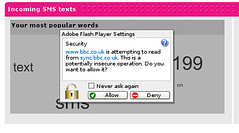
Flash cross domain request security prompt
    You make asynchronous HTTP Service Requests in Adobe Flex.

    Synchronous HTTP Service Requests could be made using JavaScript XMLHTTPRequest with the following parameters:

    xmlHTTPRequest.open("GET", "http://anyurl.com/", false)
    • RequestType: GET or POST
    • URL of the service
    • Comunication Type: true - asynchronous, false for synchronous
    important configuration files used in Adobe Flex
    1. crossdomain.xml
    2. services-config.xml - used for Flex Data SErices

    Data Push can be implemented in Adobe Flex using BlazeDS Server or LiveCycleDataServices


    How to Make HTTP Request to a Different Domains

    More DIY videos at 5min.com

    How to connect to HTTP Service using Adobe Flex 3

    Part 1: Introduction

    More DIY videos at 5min.com

    Part 2: Getting the code work

    More DIY videos at 5min.com

    Handling Result Event

    More DIY videos at 5min.com

    Handling Fault Event

    More DIY videos at 5min.com


    Reblog this post [with Zemanta]

    Thursday, August 27, 2009

    Building Simple Application with Flex

    EBA AJAX Grid + Flex Charting ComponentEBA AJAX Grid + Flex Charting Component (Photo credit: Andre Charland)
    Working with Containers

    Lets now learn about the most important MXML tag in Flex.

    Applicaiton
    Description: root container for an Flex application

    Properties:


    layout, define lay out for its child components
    , possible values for this property are:
    1. vertical - automatic top to bottom in order layout
    2. horizontal - automatic left to right in order layout
    3. absolute - no automatic layout, (x,y) location based layout
    Note: The default layout, BasicLayout renderer doesn't respect the transformations that occur in the object's width/height/position during rotation. It still tries to layout the objects as if they were not rotated. However, if you use any other layout, like VerticalLayout or HorizontalLayout, the objects new dimensions after rotation is used.
    style, defines formatting for the child components
    1. backgroundGradientColors
    2. verticalGap

    How to Use Absolute Layout in Flex


    More DIY videos at 5min.com


    How to Use the appropriate Layout Type in your Flex Applicatoin


    More DIY videos at 5min.com

    Also visit blog to learn about adding inline ActionScript in MXML code


    Friday, August 14, 2009

    Flex Technology Overview

    Screen TechnologyImage by rutty via Flickr

    Creating a Simple Application with Adobe Flex Builder


    More DIY videos at 5min.com


    key points about Flex technology that is relevant to this module.


    Wednesday, August 5, 2009

    Introducing Flash Builder 4


    Flash Builder is a commercial tool from Adobe focused on developer productivity. It supports the following capabilities.
    • Intelligent coding help and templates
    • Network monitor
    • Interactive, step-through debugger
    • Emulation and on-device debugging
    • Visual design interfae
    • Data access wizards
    • Memory and performance profilers
    • Automated testing support
    Hello World in Flash Builder 4


    Introducing Flash Builder 4


    Related articles

    Learning Adobe Flex for SAP Developers

    SAP AG logo.
    Image via Wikipedia
    Adobe Flex Icon
    Image via Wikipedia


    To see how Flex applications can be connected with an SAP backend application watch this workshop session at SAP Developer Network Day - 2006.


    Check the URL SAP Community NetWork - Learning Adobe Flex for SAP Developer. These resources will help developers integrate Adobe Flash functionality in SAP applications.

    Adobe Flex SAP Sample from SDN Day 2006 - the demo shows how to develop rich and engaging web applications using Adobe Flex over the SAP backend. Following are the steps involved:

    1. Login to SAP system, 
    2. We need to create a SAP function module from which we create the Web Service.The Processing type in the FM has to be set to Remote-Enabled Module.
    3. Go to Transaction WSADMIN to see the list of Web Services(WS) available in the System.
    4. Select the WS and open the WSDL associated with the WS. 
    5. Open the Adobe Flash Builder and declare the WS with a unique ID and provide the wsdl url.
    6. Create a Dashboard to display the data from the WS.
    For recent updates about SAP - Adobe Flex integration check the weblogs at Development Trends


    Related articles
    Enhanced by Zemanta

    Tuesday, July 28, 2009

    Preparing Adobe Flex Development Environment (Part 2), updated

    Flash Builder 4 Branding
    Image by TuttleTree via Flickr
    Download Adobe Flash Builder (its a pretty big download of around 300 MB, please feel free to read ahead while download is progressing)

    - Flash Builder 4 is available for
    Windows and Macintosh platform.

    - During installation you will be required to close your browser(s) so that the installer can upgrade your version of Flash Player to the debugger version so that you can use the full debugging capabilities built into Flash Builder.

    You can also install Adobe Flash Builder as a plugin over an existing Eclipse installation, while doing so it is recommended that you edit the eclipse.ini file for your Eclipse instance, so that it includes the following settings:
    -vmargs -Xms256m -Xmx512m -XX:MaxPermSize=256m -XX:PermSize=64m
    Highlights of Adobe Flash Builder 4.5:
    “Adobe Flash Builder 4.5 can be used to Build for Android™, BlackBerry® Tablet OS, and iOS mobile platforms using a common code base”.

    • Based on an Eclipse™ Plaform
    • Rapid development of expressive mobile, web, and desktop applications
    • Support for ActionScript®
    • Building applications using open source Flex framework. 
    • Supports for mobile application development and testing. 
    • Development of applications using common code base to build apps for Android™, BlackBerry® Tablet OS, and iOS mobile platforms while sharing code from web applications.

    Tips

    • You can install a copy of Flash Builder 4 standalone with Flex Builder 2 or 3 installations on the same machine, it will not interfere with each other.
    • Workspaces created in Flex Builder 2 or Flex Builder 3 are not supported by Flash Builder 4.
    • You can import existing Flex Builder projects in Flash Builder 4, but a project modified by Flash Builder 4 will no longer open in Flex Builder 3 or Flex Builder 2.

    Related Articles

    Which is better React Native or Native iOS and Android Development for building Mobile applications ?

      React Native vs Native (iOS, Android)   Properties/Feature React Native   Native (iOS) – Swift / Object...

    Labels