- App Launcher Icon Generator: https://jgilfelt.github.io/AndroidAss
- App Listing Feature Graphics Generator: https://www.norio.be/android-feature
- App Screenshot Maker: https://www.davinciapps.com
Showing posts with label Android. Show all posts
Showing posts with label Android. Show all posts
Monday, November 9, 2020
Useful Tools for Publishing Apps in Google Play Store
Below are some of the useful links for publishing your App in Google Play Store

Saturday, April 6, 2013
Building Beautiful Apps for BlackBerry 10 with AIR
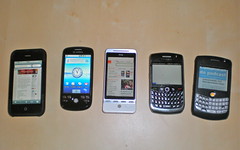 Comunicando 114 ¿Qué móvil prefieres? iPhone, BlackBerry o Android (Photo credit: jagelado)
Related articles
 BlackBerry 10 to Launch with 70,000 Apps - More than any First Generation Operating System(blogs.blackberry.com)
 BlackBerry Z10: Top 5 things you should know(blogs.blackberry.com)
 Google open to the idea of building BlackBerry 10 apps, if the user base grows(crackberry.com)

Friday, February 15, 2013
How to convert an existing Flex 3.0 or older application to Run on Mobile
 |
| Mobile web standards evolution (Photo credit: Wikipedia) |
- Create a mobile project
- Add the MX.swc to the library path of your mobile project.
- Copy the code to this mobile project. Now, you would be able to use the MX Libraries in your mobile project.
- Test the performance on the mobile device, if it is not acceptable or very slow.
- Start replacing the MX components with Spark components until performance is acceptable in Step 4.
- In case you feel, the application is not very usable in small mobile screen,
- try re-designing & re-implementing your application using only mobile supported components.
- You may consider reuse of some of your existing code to same effort & time. If very little reuse is possible you may consider evaluating development using other frameworks (for eg. Titanium, PhoneGap or HTML 5)
Sunday, September 23, 2012
Windows 8 will support Flash
Microsoft and Adobe are working together closely to ensure great Flash experience in Windows 8. Flash Player is integrated into Metro style IE10. Microsoft aims to support Flash in Windows 8 (Microsoft's forthcoming operating system ) only on trusted sites due to security reasons.
Surface RT tablets would also support Flash.
BlackBerry 10 Operating System also supports Flash making BlackBerry Playbook the only tablet that currently supports Flash.
The Apple iPad does not support Flash and is not likely in future also.
Android has basic level Flash integration in its browser which is being phased out to a mobile version of Chrome that does not support Flash.
Tuesday, May 22, 2012
Pros & Cons of use of Adobe Flex for iPhone/iPad Developers
Below are the pros and cons of Adobe Flex (http://www.adobe.com/products/flex.html) environment for iOS development.
Pros:
1. No specific Hardware need: No need for Mac OS X system for development ( works on both platforms Mac & Windows).
2. Code sharing across multiple platforms: Run the same code on other mobile platforms (BlackBerry Playbook and Android), desktops & web applications (browsers)
3. SAP Data Integration: Ease of integration with SAP backend & Web Services (or to other standard data sources)
4. Improvement Developer Productivity (Adobe Flex / ActionScript would be easier to learn for a Java developer than Objective C).
5. Design Time Integration: Eclipse based developer (Flash Builder) environment or developer tools can be integrated with SAP NetWeaver Developer Studio.
6. Low Training Cost, there are plenty of examples and development tutorials available for free to get started with Adobe Flex.
7. SAP NetWeaver GateWay Integration: https://community.wdf.sap.corp/sbs/groups/adobe-flex/blog/2011/09/02/flash-builder-and-sap-netweaver-gateway-integration
Cons:
1. Dependency on Flash Platform.
2. Licensing Cost of Software: Cost of Development tool, Adobe Flash Builder Premium license costs $699. (on single license purchase, there may be discounted price for bulk purchase)
1. No specific Hardware need: No need for Mac OS X system for development ( works on both platforms Mac & Windows).
2. Code sharing across multiple platforms: Run the same code on other mobile platforms (BlackBerry Playbook and Android), desktops & web applications (browsers)
3. SAP Data Integration: Ease of integration with SAP backend & Web Services (or to other standard data sources)
4. Improvement Developer Productivity (Adobe Flex / ActionScript would be easier to learn for a Java developer than Objective C).
5. Design Time Integration: Eclipse based developer (Flash Builder) environment or developer tools can be integrated with SAP NetWeaver Developer Studio.
6. Low Training Cost, there are plenty of examples and development tutorials available for free to get started with Adobe Flex.
7. SAP NetWeaver GateWay Integration: https://community.wdf.sap.corp/sbs/groups/adobe-flex/blog/2011/09/02/flash-builder-and-sap-netweaver-gateway-integration
Cons:
1. Dependency on Flash Platform.
2. Licensing Cost of Software: Cost of Development tool, Adobe Flash Builder Premium license costs $699. (on single license purchase, there may be discounted price for bulk purchase)
Wednesday, November 16, 2011
What's New in Flex 4.6 SDK and Flash Builder 4.6
Below is the Blog link from Adobe Developer Connection about - What's new in Flex 4.6 SDK & Flash Builder 4.6:
http://www.adobe.com/devnet/flex/articles/whats-new-flex-flash-builder-46.html
Key Improvements include:
http://www.adobe.com/devnet/flex/articles/whats-new-flex-flash-builder-46.html
Key Improvements include:
- New UI Components
- Support for latest Google tablet platform and iOS 5
- Enhanced Tooling (including monitoring and unit testing of mobile applicaitons)
- Performance Improvement
Saturday, May 21, 2011
Adobe Flex Builder 4.5 - A game changer release
Today a developer faces a challenge of making their applications run on multiple platforms. With Adobe Flash Builder 4.5 the same code works smoothly and uniformly in every device. Adobe Flex is the single framework to build applications compatible across almost all major browsers, devices and operating systems.
It supports the following platforms:
- For Desktop Applications multiple Operation Systems
- Windows,
- Mac
- Linux
- For Rich Internet Applications (RIAs) multiple Browsers
- Chrome
- Internet Explorer
- Firefox
- Safari
- For Mobilie & Table Applications multiple devices platform
- Android
- BlackBerry (Research in Motion)
- Apple iOS
- Windows Phone 7
- Developing across different form factors.
- Developing across multiple operating systems & platforms. (Android, Blackberry Tablet & iOS)
- Developing for different orientations of devices.
- Testing & Debugging your application on device.
Tuesday, July 28, 2009
Introduction to Adobe Flash Player and take a Flex Test Drive, updated

The following are three main Rich Internet Applications technologies from Adobe:
- Adobe Flex,
- Flash Player and
- Adobe Integrated Runtime (AIR)
Flash Platform is used to build
- Enterprise applicaitons
- SasS (Software as a Service)
- Consumer applications,
- Rich media applications,
- Video applications (e.g. YouTube),
- Social applications
- Games
To know about the current version of Flash Player visit the URL: https://www.adobe.com/software/flash/about/
Flex Test Drive: Build an application in an hour
Remark: You should be able to upgrade the Flex SDK without having to get your clients upgrade their Flash Player unless during major releases, to bring some predictability and allows developers to plan their upgrade cycles.
Related articles
Adobe Flash Player for Android is not available anymore at the Play Store.
Apache Flex Overview, updated
 crazy with the books (Photo credit: leff)
What is Flex?
Flex is a highly productive, free open source framework that provides enterprise-level components for Flash Platform for designing, building and maintaining expressive mobile, web and desktop applications that deploy consistently on all major devices, browsers, desktops, and operating systems.
Flex allows you to build web and mobile applications that share a common code base, reducing the time and cost of application creation and longer term maintenance.
Flex Overview
Adobe has donated the Flex SDK to Apache Software foundation. [Adobe Donating Flex to Open Source Foundation (infoq.com)]
- Flex 3 Getting Started - Animated Overview on Adobe Learning Resource
- Flex 4 Getting Started - Getting Started page for Flex 4 (current release) on the Flex Developer Center.
What is Adobe Flash Builder ?
Adobe® Flash® Builder™ 4.5 software (formerly Adobe Flex® Builder™) is an Eclipse™ based development tool for rapidly building expressive applications for the following platforms:- mobile,
- web, and
- desktop
- ActionScript® and MXML
- the open source Flex framework.
- Android™,
- BlackBerry® Tablet OS, and
- iOS mobile platforms
- intelligent coding,
- interactive step-though debugging,
- application profiling, and
- visual design of the user interface layout.
Can I learn Apache Flex (previously Adobe Flex) ?
Below are the Prerequisites for learning Adobe Flex includes basic understanding of following topics:
- Basic understanding of any programming Language ( for e.g. C#, Java, C / C++ etc..)
- HTML (Hyper Text Markup Language)
- XML (eXtensible Markup Language)
- JSON (JavaScript Object Notation)
- CSS (Cascading Style Sheets)
- Exposure to any server side technology (like ColdFusion, Java Servlet/JavaServer Pages, PHP, .NET) is recommended but not necessary.
Which languages does Flex Framework supports ?
- ActionScript - a fully object oriented, strictly typed, ECMA Script language. It is is used for describing the event handlers and custom application logic.
- MXML - an XML based markup language. It is used to provide description of the appearance and components that make up the application.
What is Flash Catalyst ?
An additional product Adobe® Flash® Catalyst™ (code-named Thermo) a professional interaction design tool for designers to create complex RIA user interfaces and interactions by using a visual editor which will create Flex application code that the designer and developer can share. Adobe Flash Catalyst is a tool for rapidly creating user interfaces without coding.Future of Flash Catalyst & Flash Builders
Following the decision of Flex moving to the Apache Foundation, that Flash Catalyst will be discontinued. Flash Builder will also have features the following features removed in future:- Design View,
- Data Centric Development (DCD)
- and Flash Catalyst workflows.
Adobe has stopped sales and development of Flash Catalyst tool, Adobe is now focusing mainly on creating tools for native applications using AIR and HTML5 for e.g.
As an alternate to Flash Catalyst it is recommended to use Adobe Creative Suite Master Collection. (refer http://www.adobe.com/in/products/flashcatalyst.html for details)
Further Reading:
- Adobe Muse (http://muse.adobe.com)
- Adobe & HTML (http://html.adobe.com/)
As an alternate to Flash Catalyst it is recommended to use Adobe Creative Suite Master Collection. (refer http://www.adobe.com/in/products/flashcatalyst.html for details)
Further Reading:
- Future of Flash and Flex
- Life After Adobe Flash Builder(drdobbs.com) - Developing Flex with using Microsoft's Visual Studios IDE
- Flex 3 LiveDocs - Flex Help Documentation
- Tour de Flex - A desktop application for exploring Flex capabilities
- Flex Developer Center - collection of resources on flex
- flex.apache.org - Apache Flex website
- Flex Showcase - list of desktop and mobile applications written in Flex
- Flex Cookbook - collection of solution to common problems
Related articles:
Talking about: Flex Gumbo (Flex 4) - new features (psyked.co.uk) - Flex 4 was codenamed Gumbo
FlexJS: Flex for HTML/JS/CSS(flexcloset.wordpress.com) - A next generation flex sdk that cross compiles MXML & ActionScript into HTML, JS and CSS.
Apache Flex 4.11 Released!(blogs.apache.org)
How is Flex Doing? Quick Start Guides and Tutorials(jetbrains.com)
Flash Platform Rundown - Week of October 27th, 2013(inflagrantedelicto.memoryspiral.com)
Alex's Flex Closet Lives On!(flexcloset.wordpress.com) - yet another blog about flex.
Thumbs Up for Apache Flex(robsondesign.com) - success story about migration from Adobe Flex 4.5.1 SDK to Apache Flex 4.10.1 SDK.
Flash Platform Rundown - Week of October 20th, 2013(inflagrantedelicto.memoryspiral.com)
Subscribe to:
Posts (Atom)
-
 List of most effective and trustworthy resources about Java Technology. Below is the list of most effective and trustworthy resources about...
 -
A simple diagram depicting the relationship between the Model, View, and Controller. Note: the solid lines indicate a direct association, a...
-
Below are some of the useful links for publishing your App in Google Play Store App Launcher Icon Generator: https://jgilfelt.github.io/And...

Related Blogs
-
-
Introduction to Silverlight 416 years ago

